

009K8s域名解析之CoreDNS文件方式配置域名
CoreDNS模块Hosts
原核心配置(学习参考)
- fallthrough:表示当在hosts找不到要解析的域名时,会将解析任务传递给CoreDNS的下一个插件。如果不写fallthrough的话,任务就此结束,不会继续解析,会导致集群内部域名解析失败的情况
- 'forward . /etc/resolv.conf':表示将所有未在K8s集群内解析的查询转发到/etc/resolv.conf文件中指定的DNS服务器。但是这个配置只针对当前节点起作用
text
apiVersion: v1
data:
  Corefile: |
    .:53 {
        errors
        health {
            lameduck 5s
        }
        ready
        kubernetes cluster.local in-addr.arpa ip6.arpa {
            pods insecure
            fallthrough in-addr.arpa ip6.arpa
            ttl 30
        }
        prometheus :9153
        forward . /etc/resolv.conf {
            max_concurrent 1000
        }
        cache 30
        reload
        loadbalance
    }
kind: ConfigMap
(注意) 生产环境切记
text
记得备份! 记得备份!! 记得备份!!!使用CoreDNS的hosts模块, 当用到的域名较少时
- 10.68.5.77 为ingress地址
- 此时, 云供应商域名 cutejava.odboy.cn 解析到 ingress 上时, 可通过域名 cutejava.odboy.cn 从公网访问到内网服务
- 前提:10.68.5.77 为 云服务商提供的公网ip地址
text
apiVersion: v1
data:
  Corefile: |
    .:53 {
        errors
        health {
            lameduck 5s
        }
        ready
        kubernetes cluster.local in-addr.arpa ip6.arpa {
            pods insecure
            fallthrough in-addr.arpa ip6.arpa
            ttl 30
        }
        prometheus :9153
        hosts {
            10.68.5.77 cutejava.odboy.cn
            ttl 60
            reload 1m
            fallthrough
        }
        forward . /etc/resolv.conf {
            max_concurrent 1000
        }
        cache 30
        reload
        loadbalance
    }
kind: ConfigMap
使用CoreDNS的hosts模块, 当用到的域名非常之多时
- reload:定义了多久重新加载一次该文件, 以获取最新的映射信息
- 10.68.147.208:Service的IP地址
编辑CoreDNS配置
shell
kubectl edit deployments.apps coredns -n kube-system -o yaml新增挂载路径(如图所示)
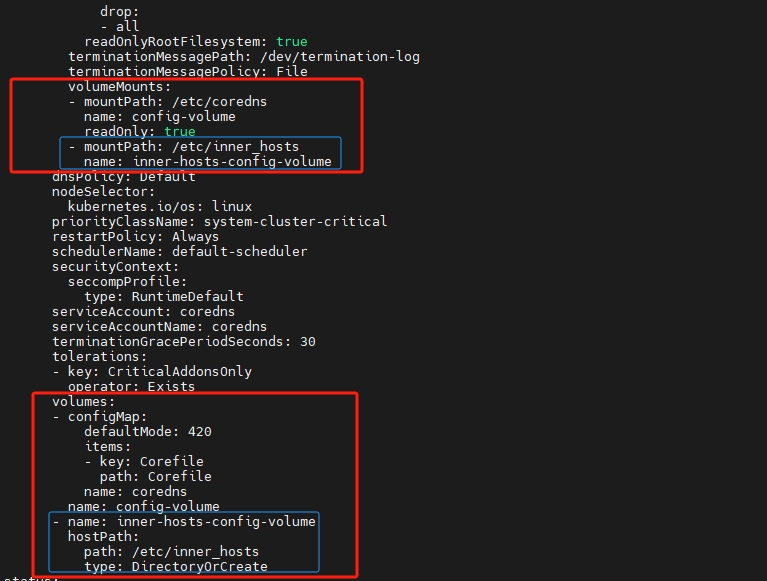
/etc/inner_hosts/com.hosts 内容
text
10.68.147.208 api1.odboy.com
10.68.147.209 api2.odboy.com- hosts /etc/inner_hosts/com.hosts com:表示 com 域名对应的解析文件为 /etc/inner_hosts/com.hosts
text
apiVersion: v1
data:
  Corefile: |
    .:53 {
        errors
        health {
            lameduck 5s
        }
        ready
        kubernetes cluster.local in-addr.arpa ip6.arpa {
            pods insecure
            fallthrough in-addr.arpa ip6.arpa
            ttl 30
        }
        prometheus :9153
        hosts /etc/inner_hosts/com.hosts com {
            reload 5s
            fallthrough
        }
        forward . /etc/resolv.conf {
            max_concurrent 1000
        }
        cache 30
        reload
        loadbalance
    }
kind: ConfigMap
重建服务(配置完毕后重建一次即可)
text
kubectl delete pods -n kube-system -l k8s-app=kube-dns最终效果
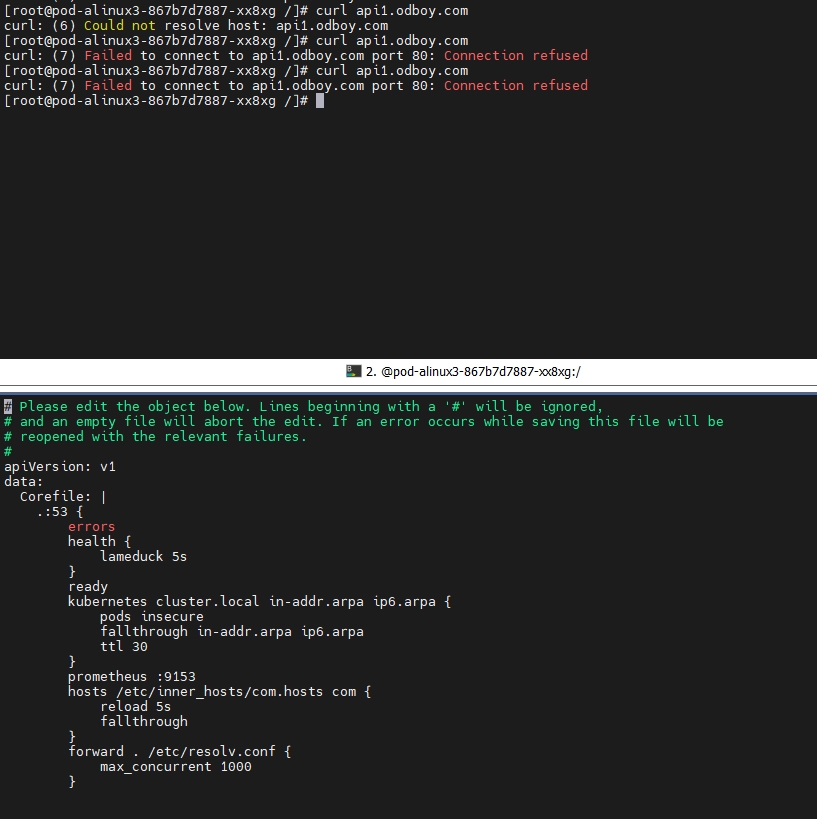
这里虽然服务80端没有通,但其实已经解析到具体的服务了