


使用企业容器镜像仓库Harbor
Docker
配置Harbor仓库
shell
cat << EOF > /etc/docker/daemon.json
{
  "exec-opts": ["native.cgroupdriver=systemd"],
  "registry-mirrors": [
    "https://docker.m.daocloud.io",
    "https://kuamavit.mirror.aliyuncs.com"
  ],
  "insecure-registries": [
    "http://easzlab.io.local:5000",
    "192.168.235.100:3080"
  ],
  "max-concurrent-downloads": 10,
  "log-driver": "json-file",
  "log-level": "warn",
  "log-opts": {
    "max-size": "10m",
    "max-file": "3"
    },
  "data-root": "/var/lib/docker"
}
EOF
systemctl daemon-reload
systemctl restart docker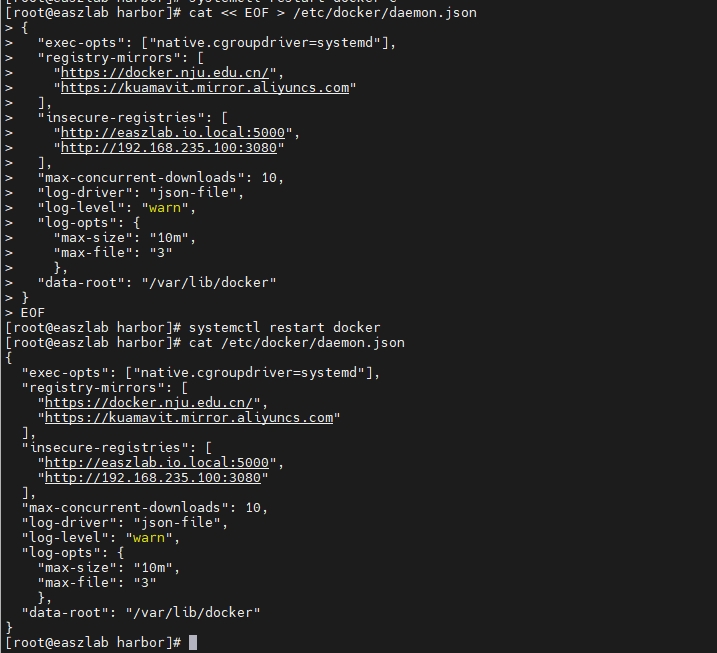
镜像上传测试
shell
docker pull registry.cn-hangzhou.aliyuncs.com/zhengqing/redis:7.0.5
# admin/Harbor12345
docker login 192.168.235.100:3080
# 这里的 library 是harbor仓库里默认自带的项目
docker tag registry.cn-hangzhou.aliyuncs.com/zhengqing/redis:7.0.5 192.168.235.100:3080/library/odboy/redis:7.0.5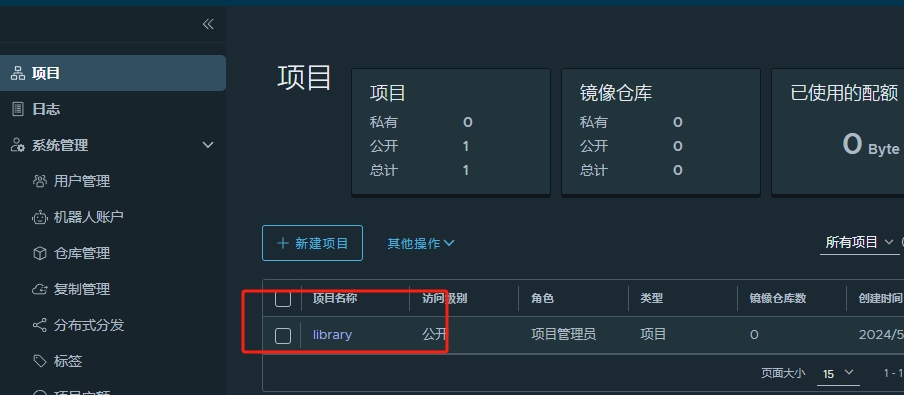
shell
docker push 192.168.235.100:3080/library/odboy/redis:7.0.5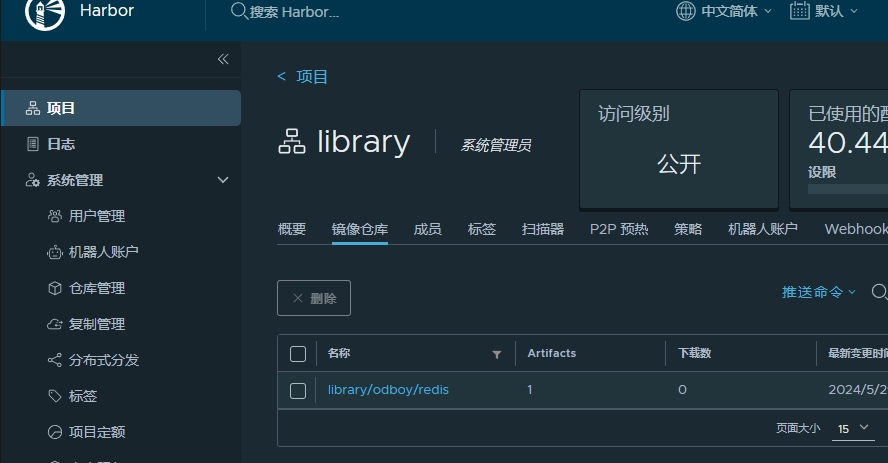
K8s
配置Harbor Secret
shell
# 类型为docker-registry
# docker-server指定harbor仓库的IP
# docker-username指定harbor仓库的登录用户名
# docker-password指定harbor仓库的登录密码

kubectl create secret docker-registry harbor-secret --docker-server=192.168.235.100:3080 --docker-username=admin --docker-password=Harbor12345
创建 redis pod 并使用 Secret
yaml
kind: ConfigMap
apiVersion: v1
metadata:
  name: harbor-pull-test
data:
  redis.conf: |
    protected-mode yes
    bind 0.0.0.0
    port 6379
    tcp-backlog 511
    timeout 0
    tcp-keepalive 300
    daemonize no
    pidfile /data/redis-server.pid
    loglevel notice
    logfile /data/redis.log
    databases 100
    always-show-logo yes
    set-proc-title yes
    proc-title-template "{title} {listen-addr} {server-mode}"
    stop-writes-on-bgsave-error yes
    rdbcompression yes
    rdbchecksum yes
    dbfilename dump.rdb
    rdb-del-sync-files no
    dir /data
    replica-serve-stale-data yes
    replica-read-only yes
    repl-diskless-sync yes
    repl-diskless-sync-delay 5
    repl-diskless-sync-max-replicas 0
    repl-diskless-load disabled
    repl-disable-tcp-nodelay no
    replica-priority 100
    acllog-max-len 128
    lazyfree-lazy-eviction no
    lazyfree-lazy-expire no
    lazyfree-lazy-server-del no
    replica-lazy-flush no
    lazyfree-lazy-user-del no
    lazyfree-lazy-user-flush no
    oom-score-adj no
    oom-score-adj-values 0 200 800
    disable-thp yes
    appendonly no
    appendfilename "appendonly.aof"
    appenddirname "appendonlydir"
    appendfsync everysec
    no-appendfsync-on-rewrite no
    auto-aof-rewrite-percentage 100
    auto-aof-rewrite-min-size 64mb
    aof-load-truncated yes
    aof-use-rdb-preamble yes
    aof-timestamp-enabled no
    slowlog-log-slower-than 10000
    slowlog-max-len 128
    latency-monitor-threshold 0
    notify-keyspace-events ""
    hash-max-listpack-entries 512
    hash-max-listpack-value 64
    list-max-listpack-size -2
    list-compress-depth 0
    set-max-intset-entries 512
    zset-max-listpack-entries 128
    zset-max-listpack-value 64
    hll-sparse-max-bytes 3000
    stream-node-max-bytes 4096
    stream-node-max-entries 100
    activerehashing yes
    client-output-buffer-limit normal 0 0 0
    client-output-buffer-limit replica 256mb 64mb 60
    client-output-buffer-limit pubsub 32mb 8mb 60
    hz 10
    dynamic-hz yes
    aof-rewrite-incremental-fsync yes
    rdb-save-incremental-fsync yes
    jemalloc-bg-thread yes
---
apiVersion: apps/v1
kind: Deployment
metadata:
  name: pod-harbor-pull-redis
spec:
  selector:
    matchLabels:
      app: pod-harbor-pull-redis
  strategy:
    type: Recreate
  template:
    metadata:
      labels:
        app: pod-harbor-pull-redis
    spec:
      containers:
        - image: 192.168.235.100:3080/library/odboy/redis:7.0.5
          imagePullPolicy: IfNotPresent
          name: pod-harbor-pull-redis
          env:
            - name: TZ
              value: Asia/Shanghai
            - name: LANG
              value: en_US.UTF-8
          ports:
            - name: svc-redis-1m0s
              containerPort: 6379
          livenessProbe:
            tcpSocket:
              port: 6379
          readinessProbe:
            tcpSocket:
              port: 6379
          resources:
            limits:
              cpu: "1"
              memory: "1G"
            requests:
              cpu: "1"
              memory: "512Mi"
          volumeMounts:
            - name: vod-pv-single-redis
              mountPath: /data
            - name: vod-cm-single-redis
              mountPath: /etc/redis/redis.conf # 将其挂载到容器的/etc/redis/redis.conf路径下
              subPath: redis.conf
          command: [ "redis-server" ,"/etc/redis/redis.conf", "--requirepass 123456", "--appendonly no" ]
      imagePullSecrets: # 定义镜像下载使用的secret
        - name: harbor-secret # 与上面的secret一致
      volumes:
        - name: timezone
          hostPath:
            path: /usr/share/zoneinfo/Asia/Shanghai
        - name: vod-pv-single-redis
          hostPath:
            path: /mnt/data/pod-harbor-pull-redis # /data目录挂载到宿主机的/mnt/data/pod-single-redis目录
            type: DirectoryOrCreate
        - name: vod-cm-single-redis
          configMap:
            name: harbor-pull-test
            items:
              - key: redis.conf
                path: redis.conf
执行命令
shell
# 把上面的yaml内容写到 harbor-pull-test.yaml 文件中
kubectl apply -f harbor-pull-test.yaml
 Pod状态 显示 ImagePullBackOff,这应该是拉镜像失败了,describe看看
Failed to pull image "192.168.235.100:3080/library/odboy/redis:7.0.5": failed to pull and unpack image " 192.168.235.100:3080/library/odboy/redis:7.0.5": failed to resolve reference "192.168.235.100: 3080/library/odboy/redis: 7.0.5": failed to do request: Head "https://192.168.235.100:3080/v2/library/odboy/redis/manifests/7.0.5": http: server gave HTTP response to HTTPS client
这个时候我们去配置 containerd 即可。
配置containerd[所有节点都要配置]
shell
vi /etc/containerd/config.toml
# --------------------------------
# 搜索配置 plugins."io.containerd.grpc.v1.cri".registry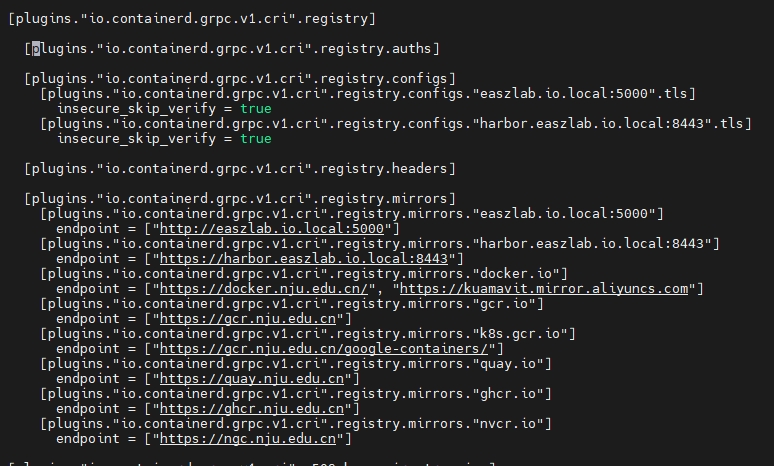
在配置项 [plugins."io.containerd.grpc.v1.cri".registry.configs] 下,增加两行配置:
toml
[plugins."io.containerd.grpc.v1.cri".registry.configs."192.168.235.100:3080".tls]
insecure_skip_verify = true
[plugins."io.containerd.grpc.v1.cri".registry.configs."192.168.235.100:3080".auth]
username = "admin"
password = "Harbor12345"
在配置项 [plugins."io.containerd.grpc.v1.cri".registry.mirrors] 下,增加一行配置:
toml
[plugins."io.containerd.grpc.v1.cri".registry.mirrors."192.168.235.100:3080"]
endpoint = ["http://192.168.235.100:3080"]
局部完整配置如下:
toml
[plugins."io.containerd.grpc.v1.cri".registry]

[plugins."io.containerd.grpc.v1.cri".registry.auths]

[plugins."io.containerd.grpc.v1.cri".registry.configs]
[plugins."io.containerd.grpc.v1.cri".registry.configs."easzlab.io.local:5000".tls]
insecure_skip_verify = true
[plugins."io.containerd.grpc.v1.cri".registry.configs."harbor.easzlab.io.local:8443".tls]
insecure_skip_verify = true
[plugins."io.containerd.grpc.v1.cri".registry.configs."192.168.235.100:3080".tls]
insecure_skip_verify = true
[plugins."io.containerd.grpc.v1.cri".registry.configs."192.168.235.100:3080".auth]
username = "admin"
password = "Harbor12345"

[plugins."io.containerd.grpc.v1.cri".registry.headers]

[plugins."io.containerd.grpc.v1.cri".registry.mirrors]
[plugins."io.containerd.grpc.v1.cri".registry.mirrors."easzlab.io.local:5000"]
endpoint = ["http://easzlab.io.local:5000"]
[plugins."io.containerd.grpc.v1.cri".registry.mirrors."192.168.235.100:3080"]
endpoint = ["http://192.168.235.100:3080"]
[plugins."io.containerd.grpc.v1.cri".registry.mirrors."harbor.easzlab.io.local:8443"]
endpoint = ["https://harbor.easzlab.io.local:8443"]
[plugins."io.containerd.grpc.v1.cri".registry.mirrors."docker.io"]
endpoint = ["https://docker.nju.edu.cn/", "https://kuamavit.mirror.aliyuncs.com"]
[plugins."io.containerd.grpc.v1.cri".registry.mirrors."gcr.io"]
endpoint = ["https://gcr.nju.edu.cn"]
[plugins."io.containerd.grpc.v1.cri".registry.mirrors."k8s.gcr.io"]
endpoint = ["https://gcr.nju.edu.cn/google-containers/"]
[plugins."io.containerd.grpc.v1.cri".registry.mirrors."quay.io"]
endpoint = ["https://quay.nju.edu.cn"]
[plugins."io.containerd.grpc.v1.cri".registry.mirrors."ghcr.io"]
endpoint = ["https://ghcr.nju.edu.cn"]
[plugins."io.containerd.grpc.v1.cri".registry.mirrors."nvcr.io"]
endpoint = ["https://ngc.nju.edu.cn"]
重启containerd并查看状态[所有节点都要配置]
shell
systemctl restart containerd
systemctl status containerd
验证pod
shell
kubectl delete pod $(kubectl get pod -A |grep harbor|awk '{print $2}')
kubectl describe pod $(kubectl get pod -A |grep harbor|awk '{print $2}') 就是这么简单。